$27 minus $10 is $17. For a coach who sells packages, that’s the real monthly gap in Calendly vs Acuity: Calendly Standard against Acuity Standard, both on yearly billing. Over a year it comes to $204. The question is what that buys, because Calendly is a link and Acuity is a front desk.
Both are good at what they are. Most coaches pick the wrong one because they compare feature lists instead of asking which job they need done. So I scored them. Eight factors, each marked out of 10, with a running tally so you can see where the lead changes hands. I weighted nothing. If one factor matters more to you, you’ll see exactly how much it swings the result.
Every price below comes from the vendors’ own pricing pages, checked 3 Nov 2026. I’m a pricing and product strategist, not a coach. On pages like these I hunt for the one feature that decides which plan you’ll really end up paying for.
Acuity wins for coaches who sell packages and need intake forms; Calendly wins for coaches who just need a clean, familiar link
- You sell multi-session packages and want a health or goals form first → Acuity
- You book free discovery calls and invoice elsewhere → Calendly Free
- You need contracts signed inside the booking flow → neither; look at Paperbell
The scoreboard at a glance
Here’s the full result before the detail. Each factor gets its own section below with the reasoning.
Acuity wins by five points. But look at how. It wins big on the three factors that are about selling coaching (payments, forms, packages). Calendly wins on price, polish and plugging into other apps. Which side matters more depends on how you sell.
Factor 1: what each one costs
| Plan | Yearly billing | Monthly billing | Takes payments |
|---|---|---|---|
| Calendly Free | $0 | $0 | No |
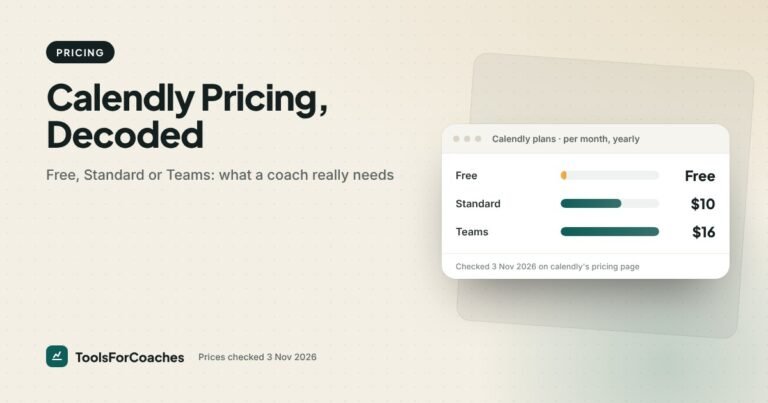
| Calendly Standard | $10/seat/mo | $12/seat/mo | Yes |
| Calendly Teams | $16/seat/mo | $20/seat/mo | Yes |
| Acuity Starter | $16/mo | A little more | Yes |
| Acuity Standard | $27/mo | A little more | Yes, plus packages |
| Acuity Premium | $55/mo | A little more | Yes, plus packages |
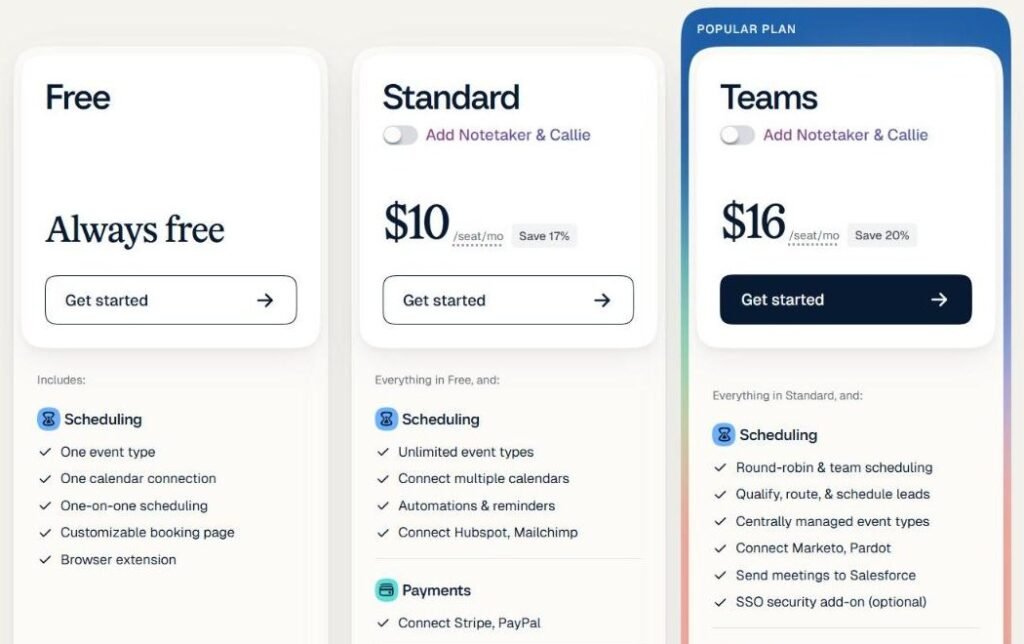
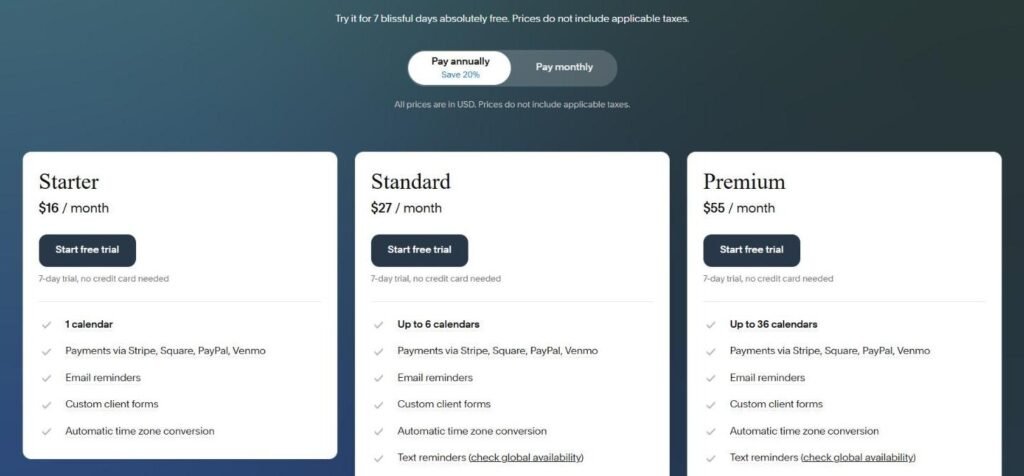
Calendly has a free plan. Acuity doesn’t. That alone gives Calendly the point.
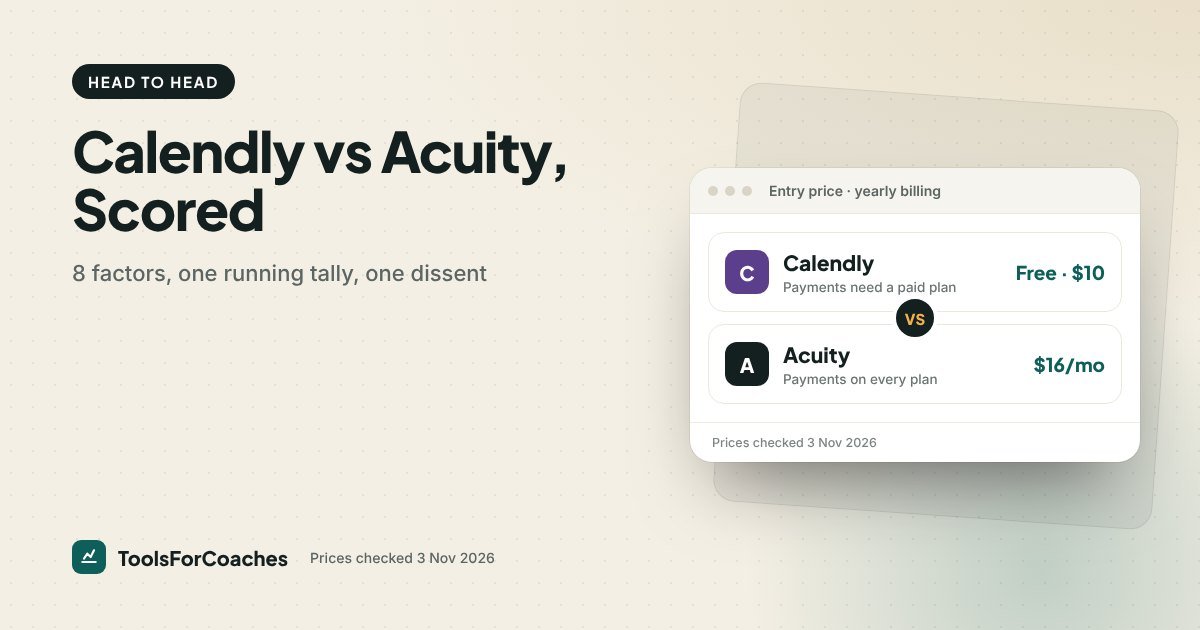
But the fair comparison for a coach who charges at booking is Calendly Standard at $10 a month against Acuity Starter at $16. That’s a $6 gap, or $72 a year. If you sell packages, though, the Acuity plan you need is Standard at $27, since packages start there. That’s a $17 gap, or $204 a year. Still less than one or two coaching sessions for most people.
Score: Calendly 9, Acuity 6. Calendly is cheaper at every level that matters, and free if you don’t take payments.
Running tally: Calendly 9, Acuity 6.
Factor 2: taking payment at booking
This is the factor that sends most coaches looking. It’s also where Calendly’s free plan stops working for a paid practice.
On Calendly, collecting payments through Stripe or PayPal needs a paid plan. On Acuity, payment collection through Stripe, Square, PayPal or Venmo comes with every paid plan, including Starter. So both can take money. The difference is in what you can sell.
Calendly takes payment for a meeting. That’s it. Acuity can take payment for a meeting on any plan, and from Standard up for a package of meetings, a membership, or a gift certificate. For a coach, those extra options are the ones that make money.
Acuity also supports Square, which matters for coaches who do some in-person work and already use Square for card readers.
Score: Calendly 6, Acuity 9. Both get you paid. Acuity gives you more ways to be paid, though packages and memberships need Standard.
Running tally: Calendly 15, Acuity 15.
Factor 3: intake forms before the first session
A good intake form saves the first fifteen minutes of every new client relationship. It’s where you ask what they want to change, what they’ve tried, and anything you need to know before you start.
Calendly lets you add questions to the booking form. Short text, multiple choice, the basics. For a discovery call, that’s plenty.
Acuity goes much further. You can build proper intake forms with different field types, make some questions required, show different forms for different session types, and keep the answers on the client’s record. A health coach can ask for a full history. A career coach might want a CV upload, so check which Acuity plan includes file upload fields before you buy. The answers sit in one place for every future session.
I hear this one a lot: a coach has run Calendly with a handful of booking questions for years and spends the start of every first session asking the rest. With Acuity, the full form goes out with the booking, so session one starts on the real work.
Score: Calendly 6, Acuity 9. Acuity’s forms are built for client work. Calendly’s are built for meeting prep.
Running tally: Calendly 21, Acuity 24.
Factor 4: packages and memberships
This is the widest gap on the board.
Coaching is sold in bundles. Six sessions. Twelve weeks. A monthly retainer with two calls. Acuity handles all of these directly from its Standard plan ($27 a month yearly). A client buys a package, gets credits, and books against them until they run out. Memberships work the same way on a recurring basis. You don’t track anything by hand.
Calendly is built around single meetings. You can sell a package by charging the full price on the first booking and sending a separate link for the rest. Some coaches do this. It works until a client books session seven of a six-session package, and you have to notice.
If you sell single sessions, this factor doesn’t matter to you. If you sell packages, it might be the only factor that does.
Score: Calendly 4, Acuity 9. Calendly can be bent into packages. Acuity is built for them.
Running tally: Calendly 25, Acuity 33.
Factor 5: reminders and no-shows
Both tools send email reminders and let you set when they go out. On Acuity, text reminders start on Standard. On Calendly, check which plan includes texts on its pricing page before you buy.
Acuity edges ahead on control. You can change the reminder text for each session type, add prep notes, and include the intake form link if someone hasn’t filled it in. That last part is small but useful.
Calendly’s reminders are clean and reliable. Its workflows let you send follow-ups after a meeting too, on paid plans. For most coaches, that’s enough.
One thing both tools share: the best defence against no-shows isn’t a reminder. It’s payment at booking. People turn up to what they’ve already paid for.
Score: Calendly 7, Acuity 8. Close. Acuity’s per-session control wins it by a point.
Running tally: Calendly 32, Acuity 41.
Factor 6: group sessions and workshops
Many coaches run something with more than one person in the room. A monthly group call. A paid workshop. A small cohort.
Calendly has group event types, where several people book the same slot up to a limit you set. It’s simple and it works.
Acuity calls these classes. You set a time, a number of seats and a price, and people book a seat. You can also sell a class as part of a package, so a client’s 6-pack might include group calls and 1-to-1 sessions together.
Neither is a course platform. If your group work has lessons, a community and replays, that belongs somewhere else. Our guide to the best course platforms for coaches covers that.
Score: Calendly 8, Acuity 8. A tie. Both do group bookings well for a solo coach.
Running tally: Calendly 40, Acuity 49.
Factor 7: integrations with the rest of your tools
Calendly connects to almost everything. Video tools, CRMs, email platforms, Zapier, and a long list of business apps. Because so many companies use it, most tools build a Calendly connection first.
Acuity has the important ones: calendars, video calls, payments, and Zapier for anything else. Its standout is Squarespace. Acuity is owned by Squarespace, so if your site is built there, booking slots straight into your pages with very little effort.
Outside Squarespace, Acuity works fine but the list of direct connections is shorter. You’ll lean on Zapier more often. If you’re new to it, our guide to Zapier for coaches shows the automations that are actually worth setting up.
Score: Calendly 9, Acuity 7. Calendly plays with more apps. Acuity wins only if you’re on Squarespace.
Running tally: Calendly 49, Acuity 56.
Factor 8: how easy each is to set up and use
Calendly is the easiest scheduling tool I know of. You connect a calendar, set your hours and have a link in a few minutes. Your clients have probably used it before, which means no learning curve on their side either.
Acuity takes longer. There are more settings because it does more. Packages, forms, classes and memberships all need setting up. The admin screens feel older and busier. None of it is hard, but expect an afternoon, not ten minutes.
On the client side, Acuity’s booking page is clear but less modern-looking than Calendly’s. For most clients, that doesn’t matter. For a coach whose brand is very polished, it might.
Score: Calendly 9, Acuity 7. Calendly is faster to start and smoother to use.
Final tally: Calendly 58, Acuity 63.
The overall score: Acuity 63, Calendly 58
Acuity wins the Calendly vs Acuity scorecard by five points. Here’s what that means in plain terms.
Acuity’s wins are on payments, intake forms and packages. Those three factors are how a coaching practice makes money and runs smoothly. Calendly’s wins are on price, integrations and ease. Those factors are about convenience.
If you sell packages and need real intake forms, Acuity is the better tool and the extra $17 a month for Standard is easy to justify. If you mostly book free calls or single sessions and value speed, Calendly is the better tool, and it might cost you nothing.
- Payments via Stripe, Square or PayPal on every paid plan
- Packages, memberships and gift certificates built in, from Standard
- Detailed intake forms tied to each client
- Smooth fit for Squarespace websites
- More control over reminders per session type
- A free plan for free calls
- Cheaper paid plan: $10 vs $16 a month yearly
- The link most busy clients already know
- Connects to more apps directly
- Faster to set up and easier to use day to day
The dissent: when Calendly should win anyway
Scores add up evenly. Businesses don’t. Here’s the case for Calendly that the tally doesn’t capture.
If you’re an executive or leadership coach, your client often isn’t the one booking. An assistant is. Or a company pays by invoice through procurement, so you never take payment at booking at all. In that world, three of Acuity’s big wins (payments, packages, intake) count for nearly nothing. Calendly’s strengths (familiar, fast, connects to corporate tools) count for everything.
Re-score it for that coach. Drop payments, packages and intake to equal marks, since they don’t apply. Calendly comes out ahead, comfortably. And it might cost $0 on the free plan.
So if your work is paid by companies, not by people, ignore my verdict and stay on Calendly. The five-point gap is real for most coaches. It’s backwards for you.
The tie-breaker most coaches forget: hours, not dollars
The $204 a year between Calendly Standard and Acuity Standard, the plan a package seller needs, is easy to see. The time cost is harder to see, and often bigger.
Do the sum. Sign four new package clients a month on Calendly and each one needs a separate payment link for the rest of the package, a separate intake form, and a line in a spreadsheet of sessions used. Call it fifteen minutes per client, plus the odd mix-up. That’s an hour a month of admin, every month, that Acuity would do for you.
Now flip it. If you book mostly free discovery calls and one-off sessions, Acuity’s extra setup is pure cost. You’d spend an afternoon building packages you don’t sell, then use a busier admin screen every day for no gain.
Same tools, opposite answers. Before you decide, count how many packages you sold last quarter. If the answer is zero, Calendly. If it’s more than a handful, Acuity will pay for itself in time saved alone.
Who should buy neither
Some coaches will find both tools fall short.
- Coaches who need contracts signed before the first session. Neither tool builds contracts into the booking flow. Paperbell does: package, contract (via Dropbox Sign), payment and first booking in one go. It costs $970 a year ($97 billed monthly), with no free plan, so it only makes sense once contracts are a real job. See the Paperbell review.
- Coaches who want payments for $0. Cal.com’s free plan includes built-in payments as of October 2026, with unlimited event types. Our Cal.com vs Calendly post covers the trade-offs.
- Coaches who send proposals and staged invoices. A CRM like HoneyBook or Dubsado covers booking as one part of a bigger job. Check the plan: HoneyBook’s Scheduler starts on Essentials ($49 a month yearly), and Dubsado’s scheduling is Premier-only.
For all the options in one place, see our ranking of the best scheduling software for coaches, or browse Calendly alternatives sorted by what you need.
Which Acuity or Calendly plan to actually buy
If you’ve picked a side, here’s the plan.
If you chose Calendly
- Free: you only book free calls and invoice elsewhere.
- Standard ($10/seat/mo yearly): you want clients to pay when they book. This is the plan most paid coaches need.
- Teams ($16/seat/mo yearly): you have an associate coach or an assistant who books for others.
If you chose Acuity
- Starter ($16/mo yearly): a solo coach with one calendar, forms and payments, selling single sessions.
- Standard ($27/mo yearly): you sell packages, memberships or gift certificates, want text reminders, or need up to 6 calendars. This is the plan most package coaches need.
- Premium ($55/mo yearly): a larger practice with several staff, up to 36 calendars.
On both, pay yearly if you’re sure. Calendly Standard saves $24 a year on yearly billing. Acuity’s yearly billing saves 20%.
What I’d pick
If I were a solo coach selling packages to individuals, I’d pick Acuity. I’d go straight to Standard, since that’s where packages start. Then I’d pay yearly and spend one afternoon building a proper intake form and my main package. $324 a year buys a front desk that sells, books and tracks sessions without a spreadsheet.
If my clients were companies, or I only booked free calls, I’d stay on Calendly and not think about it again.
And if I needed signed contracts before session one, I’d skip both and go to Paperbell. That’s not a cop-out. It’s the one job neither of these does well. Just know it costs about three times Acuity Standard, so be sure you need the contract step.
Calendly vs Acuity: questions coaches ask
Is Acuity better than Calendly for coaches?
For coaches who sell packages and need intake forms, yes. Acuity scored 63 to Calendly’s 58 in our scorecard, winning on payments, forms and packages. Calendly is better for coaches who book free calls or whose clients are companies.
Does Acuity have a free plan?
No. Acuity offers a free trial, then plans start at $16 a month on yearly billing (a little more billed monthly). Calendly does have a free plan, but it can’t take payments.
Which is cheaper, Calendly or Acuity?
Calendly. Its free plan costs nothing, and its cheapest paid plan that takes payments is $10 a seat per month on yearly billing. Acuity’s cheapest plan, Starter, is $16 a month on yearly billing.
Can Calendly sell coaching packages?
Not directly. Calendly is built around single meetings, so packages need workarounds like charging the full price on the first booking. Acuity handles packages and memberships as a built-in feature from its Standard plan, $27 a month yearly.
Does Acuity work with Squarespace?
Yes. Acuity is owned by Squarespace, so it fits very smoothly into Squarespace sites. It also works on other website builders through embeds and links.
What payment processors do Calendly and Acuity support?
Calendly supports Stripe and PayPal on paid plans. Acuity supports Stripe, Square, PayPal and Venmo on every paid plan. Card fees of about 2.9% + 30¢ per sale apply on both.