Which costs less for a first course: a $29 plan or a $69 one? If you’re weighing Thinkific vs Teachable in 2026, that question matters more than any feature list. Once you sell more than about $533 a month, the answer is the $69 one. Two lines on the pricing page decide it: first the transaction fee, then the price of the cheapest plan without one.
Both platforms killed their free plans this year. Then, in late October, Thinkific retired its Basic plan; the cheapest plan is now Start. That changes how a first course gets made. You can’t build quietly on a free tier for six months any more. You pick a paid plan on day one, and the plan you pick shapes what you pay for the next year.
So I scored both platforms on eight factors that matter for a first course. Each factor gets a short section, a score out of 10 for each tool, and a running tally. At the end you’ll see the total, plus a dissent: the case for the tool that lost.
Teachable Builder is now the better-value first-course platform for most coaches: $69 a month, 0% fees and room for 10 products.
- First course, expecting more than about $533 a month in sales → Teachable Builder is cheapest
- Planning lots of courses, a community or a membership → Thinkific Start at $82
- Teachable Starter’s 7.5% fee → only makes sense under about $533 a month in sales
The coach who almost picked the “cheap” plan
The coach who brings me this question usually has two tabs open: Thinkific Start at $82 a month and Teachable Starter at $29. She’s just starting out and doesn’t want to overspend, so the $29 tab looks like the safe choice.
For this article, say her name is Dana. She’s a nutrition coach with a four-week meal-planning program at $149, sold to her Instagram followers and a few past clients, and she hopes for 10 to 15 sales a month. Ten sales is $1,490, and Starter’s 7.5% takes about $112 of it, so her “cheap” plan really costs roughly $141 a month against $82 on Thinkific Start, for the same course and the same students.
The cheap one is the expensive one. And the tab coaches like Dana rarely open, Teachable Builder at $69 a month with no fee, beats both. That’s why the scorecard below starts with price and fees side by side.
Factor 1: Sticker price
This is what you see first, so it’s where we start.
| Plan | Yearly billing | Monthly billing | Platform fee |
|---|---|---|---|
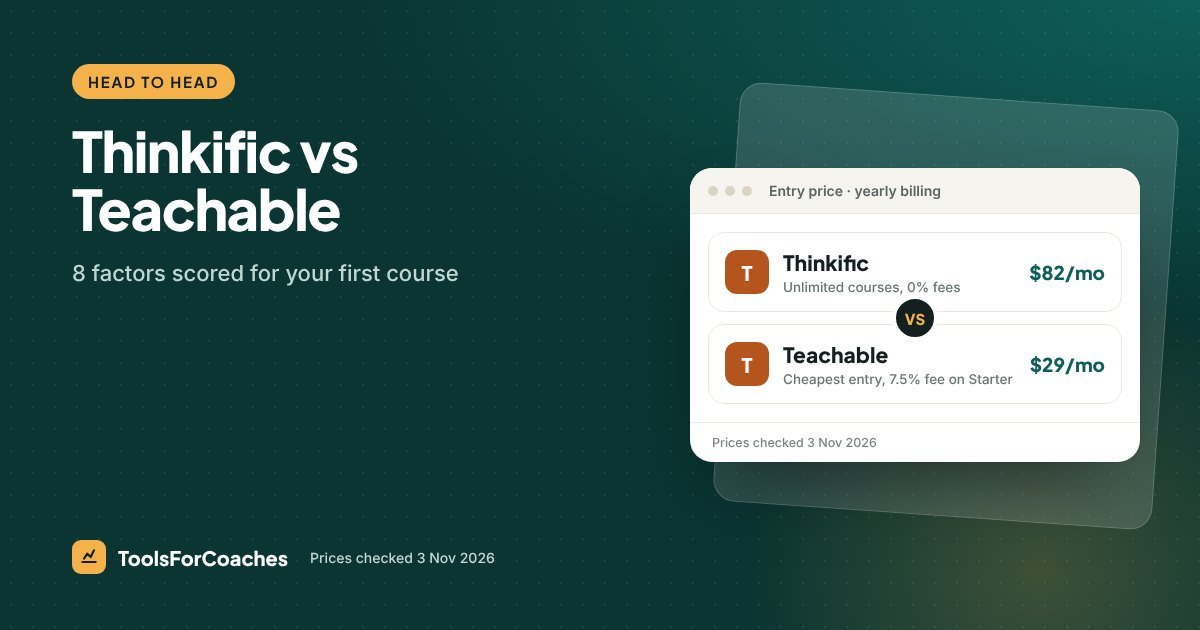
| Teachable Starter | $29/mo | $39/mo | 7.5% |
| Teachable Builder | $69/mo | $89/mo | 0% |
| Thinkific Start | $82/mo | $109/mo | 0% |
| Teachable Growth | $139/mo | $189/mo | Check Teachable’s page |
| Thinkific Grow | $164/mo | $219/mo | 0% |
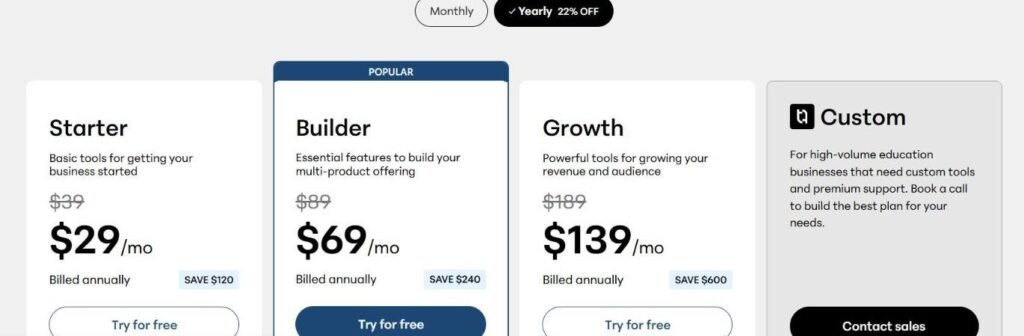
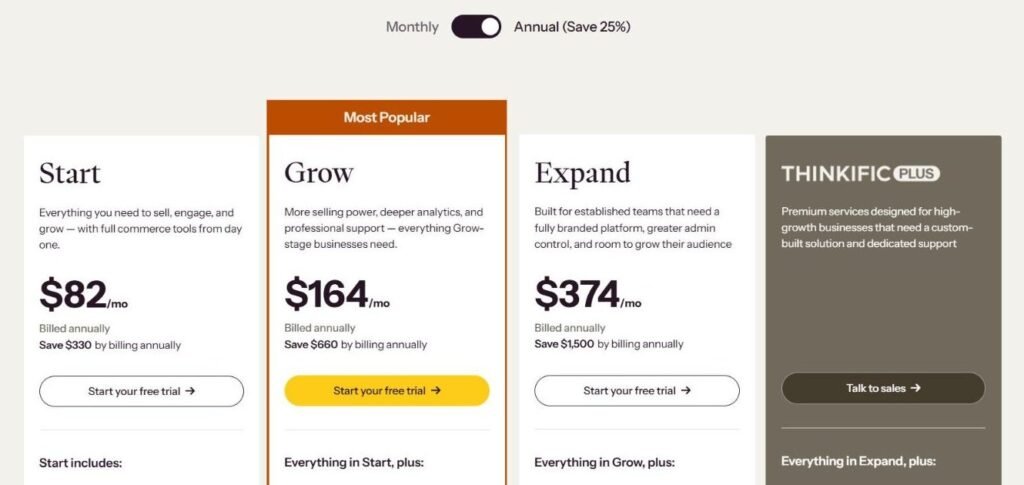
Teachable Starter has the lowest entry price, $53 a month under Thinkific Start. Between the 0%-fee plans, Teachable Builder at $69 is $13 cheaper than Thinkific Start at $82.
On sticker price, Teachable takes both slots: the cheapest plan and the cheapest no-fee plan. Older guides that call Thinkific the cheap option are out of date. This one goes clearly to Teachable.
Factor 2: The 7.5% question
Here’s where the Thinkific vs Teachable gap opens up.
Thinkific charges no platform transaction fee on any plan. Teachable Starter takes 7.5% of every sale. Teachable Builder takes 0%. Both platforms also pass on Stripe or PayPal processing, about 2.9% + 30¢ per sale. That part is the same on both, so it doesn’t change the score.
The 7.5% is the whole game for a first course. Two break-even points matter:
- Teachable Starter vs Teachable Builder: about $533 a month. Builder is $40 more. 7.5% of $533 is $40. Above that, Builder wins.
- Teachable Starter vs Thinkific Start: about $707 a month. Starter is $53 cheaper. 7.5% of $707 is about $53. Sell more than that and Thinkific Start beats Starter too.
Four sales of a $149 course is $596, and you’ve already crossed the first line. At $2,000 a month in sales, Starter’s fee is $150 a month, more than Builder’s or Start’s entire price.
Thinkific still has the cleaner fee story: there’s no fee on any plan, so there’s no trap to avoid. Teachable isn’t punished too hard, though, because Builder solves the problem, and does it for less than Thinkific’s entry plan. But you have to know to pick it. Many first-time course creators don’t, which is exactly the trap in Dana’s two tabs.
Factor 3: Building the course itself
A first course is usually video lessons, a worksheet or two, maybe a quiz. You want a builder that gets out of the way.
Thinkific Start includes unlimited courses and students, plus quizzes, drip content and certificates. Those last three matter more than they sound:
- Quizzes let you check people are learning, which helps completion.
- Drip releases lessons over time. Good for a four-week program like Dana’s.
- Certificates are a small touch that coaching clients often like sharing.
Teachable’s course builder is mature and many coaches find it simple to use. I’m not going to list which features sit on which Teachable plan, because I couldn’t verify that cleanly for 2026. Check Teachable’s pricing page for the plan you’re looking at, especially if quizzes or certificates matter to you.
The deciding point for me is “unlimited” on Thinkific’s entry plan. Teachable’s plans are capped by products. Starter allows 5, Builder 10 and Growth 50. Students aren’t capped on any plan. Your first course is rarely your last. Knowing you can add a mini-course or a free lead-magnet course without changing plans is worth a lot. Thinkific has been a course-first platform for a long time, and the builder shows it.
Factor 4: The checkout page
Your checkout is where a curious visitor becomes a paying student. It needs to be quick, trustworthy and clear on a phone.
This is Teachable’s best factor. Teachable has put a lot of work into its sales pages and checkout over the years, and it shows in how polished they feel out of the box. For a first-time course seller with no designer, that’s a real plus.
Thinkific’s checkout does the job well. It’s clean and takes card payments through the usual processors. It just feels a bit more plain by default. If you care about conversion details on your checkout page, spend 20 minutes in each trial clicking through as a buyer. That test beats any review.
Try this in both trials: make a $1 test product, open the checkout on your phone, and buy it with your own card. Note how many taps it takes and whether anything feels off. Then refund yourself.
Factor 5: Getting your money out
Payouts sound boring until you’re waiting for one.
On both platforms, card processing runs through Stripe or PayPal at roughly 2.9% + 30¢ per sale. That’s a tie. The differences come in how each platform handles payouts: whether money goes straight to your own Stripe account or through the platform’s own payments product, and how quickly it lands.
Both Thinkific and Teachable offer their own payments options alongside direct processor connections. I’m not quoting payout days here. Before you pick, check Thinkific’s and Teachable’s payout settings in each help centre against your cash-flow needs.
For a first course, the practical rule is simple. Connect your own Stripe account where you can. It keeps your customer and payment records in a place you control if you ever move.
Factor 6: Help when something breaks
Your first course will have a moment where a video won’t upload or a student can’t log in. Who helps, and how fast?
Both platforms have large help centres, active user communities and lots of third-party tutorials. That matters more than it sounds. When you’re stuck at 10pm, a clear help article usually beats waiting for a support reply.
Support levels often differ by plan on both platforms, and I haven’t verified the 2026 support tiers for each. What I’d say from watching how these companies operate: both are big, established players with good self-serve docs. Neither is a small startup that might vanish. I score this a tie.
Factor 7: How hard is it to leave?
Nobody plans to leave their first course platform. Most people do eventually. So it’s worth asking how locked in you’ll be.
Neither platform gives you a free plan to fall back on any more. If you stop paying, your course stops being sold. So the real lock-in questions are:
- Where does your student list live? On both, you can export it. Keep a copy in your email tool from day one.
- Who holds your payment records? If you use your own Stripe account, you keep them.
- How painful is a monthly exit? Thinkific Start monthly is $109. Teachable Builder monthly is $89. If you want to test without a yearly commitment, Teachable is now the cheaper way to stay flexible on a 0%-fee plan.
I give Teachable the edge here, mostly because its cheapest no-fee plan costs $20 a month less to keep month-to-month. A smaller yearly bill up front ($828 against $984) also makes it easier to walk away.
Factor 8: The next step up
Your second year will look different from your first. Maybe you’ll want a group program, a membership, or a bundle of courses. What does the upgrade path look like?
On Thinkific, most of that is already in the entry plan. Start includes communities, memberships and bundles. The next plan, Grow, is $164 a month on yearly billing ($219 monthly). That’s $82 more, and many coaches will never need it.
Teachable’s next plan after Builder is Growth (formerly Pro), at $139 a month on yearly billing or $189 monthly. It raises the product cap from 10 to 50. Teachable’s step is smaller in dollars, $70 against $82. But coaches often make it because they hit Builder’s 10-product cap, not because they wanted something new. On Thinkific, with no course cap, the upgrade is a choice rather than a wall.
The final Thinkific vs Teachable score
Each tool wins three factors, and two are ties. Teachable edges it by a single point, almost entirely on price. When Thinkific had a cheaper entry plan, this went the other way. With Start as the floor, Teachable Builder does the core first-course job for $13 a month less. Thinkific’s wins, on fees, the course builder and the upgrade path, are real, but they matter more in year two than in month one.
Scores are my editorial judgement, not lab tests. I haven’t run a course on either platform myself. They’re based on the vendors’ pricing pages (checked 3 Nov 2026), the published plan contents, and years of watching how SaaS companies decide what goes into each plan. We re-check prices monthly.
What a first year actually costs
Here’s a simple first-year shape: three months building with no sales, then nine months at $1,000 a month.
| Plan | Months 1–3 ($0 sales) | Months 4–12 ($1K/mo) | Year total |
|---|---|---|---|
| Teachable Builder | $207 | $621 | $828 |
| Thinkific Start | $246 | $738 | $984 |
| Teachable Starter | $87 | $936 | $1,023 |
Starter wins the first three months. Then it loses the year to both no-fee plans. Builder comes out $156 cheaper than Thinkific Start over the year, and $195 cheaper than Starter.
The dissent: when Thinkific is the right call
A one-point win can hide good reasons to pick the loser. Here are mine for Thinkific.
If you already know your first course won’t be your only one, the 10-product cap on Builder matters. Lead magnets, mini-courses, a paid workshop and a bundle all count. Thinkific Start has no course cap, so you’ll never be pushed to a $139 plan just to add product number eleven.
If your course is heading towards a group program, Start already includes communities, memberships and bundles. Check which Teachable plan covers what you need before you assume Builder does. Paying $13 a month more to have the group inside the platform is a fair trade for many coaches.
And if the course builder matters most to you, Thinkific’s depth is worth something. Quizzes, drip and certificates all come on the entry plan. The fee story is simpler too: no plan to avoid. Over a year, the premium is $156. For some coaches that’s the cheapest insurance they’ll buy.
- 0% fee on every plan, so there’s no fee trap
- Unlimited courses, quizzes, drip and certificates on Start
- Communities, memberships and bundles on the $82 entry plan
- No product cap forcing an upgrade
- Lowest entry price at $29 for very low sales
- Builder removes the fee at $69, $13 less than Thinkific Start
- Polished checkout and sales pages out of the box
- Cheaper monthly billing on a no-fee plan ($89 vs $109)
Three kinds of first course, three answers
“First course” covers a lot of ground. A tiny mini-course and a premium group program are both first courses. The Teachable vs Thinkific answer changes a little depending on which one you’re building.
The lead-magnet or bonus course
You’re making a short course to give away, or to bundle as a bonus for 1-to-1 clients. Sales will be close to zero by design.
Pick: Teachable Starter at $29 a month is the cheapest paid platform here, and with no sales the 7.5% fee doesn’t bite. One catch: Starter caps you at 5 products, so a lead magnet plus a few paid courses will fill it fast. If you think several paid courses will follow, Thinkific Start at $82 is the better long-term home, since you won’t need to move. This is the one case where Teachable’s entry plan is a fair pick.
The low-price evergreen course
Something like Dana’s: a modest price, sold steadily to your audience month after month. Sales might be $500 to $2,000 a month.
Pick: Teachable Builder. At these sales levels, Teachable Starter’s fee costs you $37.50 to $150 a month. At the low end, Starter and Builder cost about the same; above about $533 a month, Builder wins and keeps winning. Builder charges nothing on top of its $69. Thinkific Start does the same for $82, which is worth it if you expect to pass 10 products.
The cohort or group program
A higher-priced program with live calls and a group of students who talk to each other. This is where a lot of coaches end up by year two.
Pick: Thinkific Start at $82 a month. It includes communities and memberships, so your group has a place to talk inside the platform. You could run the course on Teachable Builder and host the group elsewhere, but having it in one place is easier for students.
Neither one replaces your marketing email
This catches out first-time course creators on both platforms. Thinkific’s built-in email is basic; most coaches pair it with Kit or MailerLite for newsletters and launch sequences. Teachable is a course platform first too; check its plan page for what email it includes, but most coaches pair it with a dedicated email tool.
So whichever you pick, you need an email tool alongside. The good news: it can be free to start.
- Kit Free plan: $0 up to 10,000 subscribers. One automation, one sequence. Kit branding. No app integrations.
- beehiiv Free plan: $0 up to 2,500 subscribers. Built more for newsletters than for selling.
- MailerLite free plan: now 250 subscribers and 2,500 emails a month after its 2026 cut.
For a first course, I’d start on Kit’s free plan. One welcome sequence that ends with a link to your course is enough to launch. When you want buyers tagged and moved into a follow-up sequence automatically, Kit Creator starts at $33 a month on yearly billing for 1,000 subscribers.
That makes the real first-course stack Teachable Builder plus Kit Free at $69, or Thinkific Start plus Kit Free at $82. The $13 gap holds.
A 30-minute test before you commit
Since there’s no free plan on either side, use the trials well. Teachable’s free trial runs 7 days, so plan your half hour before you start it. Here’s the test. Do it on both platforms on the same day so the comparison is fresh.
- Upload one real lesson video (5 min). Note how long it takes and whether anything is confusing.
- Add a quiz and a downloadable worksheet (5 min). This shows you the builder’s feel.
- Set up drip so lesson two opens a week after lesson one (5 min).
- Build the sales page with a headline, three bullets and a price (10 min). Don’t polish. Just see how it looks on your phone.
- Buy your own course at $1 with your real card (5 min). Then refund yourself.
By the end, you’ll have a gut feel for which one you’d rather open every week. That matters. The tool you’re happy to log into is the tool you’ll keep improving your course in.
Before your trial ends: decide on monthly or yearly billing on purpose. On Thinkific Start, yearly saves $27 a month. On Teachable Builder, it saves $20. Don’t let a trial roll into a plan you didn’t choose.
What I’d do for your first course
Start on Teachable Builder. Pay monthly for the first two or three months at $89 while you build and test. Switch to yearly at $69 once your course is live and selling. Skip Starter unless you’re sure sales will stay under about $533 a month.
Pair it with Kit’s Free plan for email. It covers up to 10,000 subscribers with one automation and one sequence, which is plenty for a first launch.
If you already know you’ll build lots of courses or a community, start on Thinkific Start instead: $109 monthly while you test, then $82 yearly. For a coach like Dana, Builder is the pick. Eight sales in a month, $1,192, would cost about $89 in fees on Teachable Starter. That’s more than Builder’s whole price.
Weighing a bigger all-in-one instead? See Kajabi vs Thinkific. Want the full field? Our course platform rankings cover five options. And if you’re already on Teachable Starter, read Teachable pricing for when to move to Builder.
Thinkific or Teachable: what people ask
Is Thinkific or Teachable better for beginners?
For most beginners, Teachable Builder is now the better value. It’s $69 a month on yearly billing with no platform fee and room for 10 products. Thinkific Start costs $82 with unlimited courses and a community included. Teachable Starter is cheaper at $29, but its 7.5% fee makes it cost more than Builder once you sell more than about $533 a month.
Does Thinkific still have a free plan?
No. Thinkific dropped its free plan and offers a free trial. It also retired its Basic plan in late October 2026, so the cheapest plan is now Start. Teachable also dropped its free plan in 2026 and offers a 7-day free trial, so both platforms now start at a paid plan.
What is Teachable’s transaction fee?
Teachable Starter takes 7.5% of each sale. Teachable Builder takes 0% in platform fees when you use teachable:pay. On top of that, Stripe or PayPal charge about 2.9% + 30¢ per sale, as they do on every platform.
Does Thinkific charge transaction fees?
Thinkific charges no platform transaction fee on any of its plans. You’ll still pay standard payment processing, roughly 2.9% + 30¢ per sale.
When should I upgrade from Teachable Starter to Builder?
When your sales pass about $533 a month. At that point, Starter’s 7.5% fee costs more than the $40 price gap to Builder. Also upgrade if you’re nearing Starter’s cap of 5 products. If you expect to hit either point soon, start on Builder.